


Menu
Shopping Cart
Close

Desktop Roller Banner Uses: Big Impact from Small Displays

Prospects rarely remember a leaflet left on a counter, but they do notice a bold graphic standing upright at eye level. A desktop roller banner turns dead desk space into a miniature billboard, constantly working while staff talk, type or take payments, nudging people toward your offers without feeling pushy or intrusive.

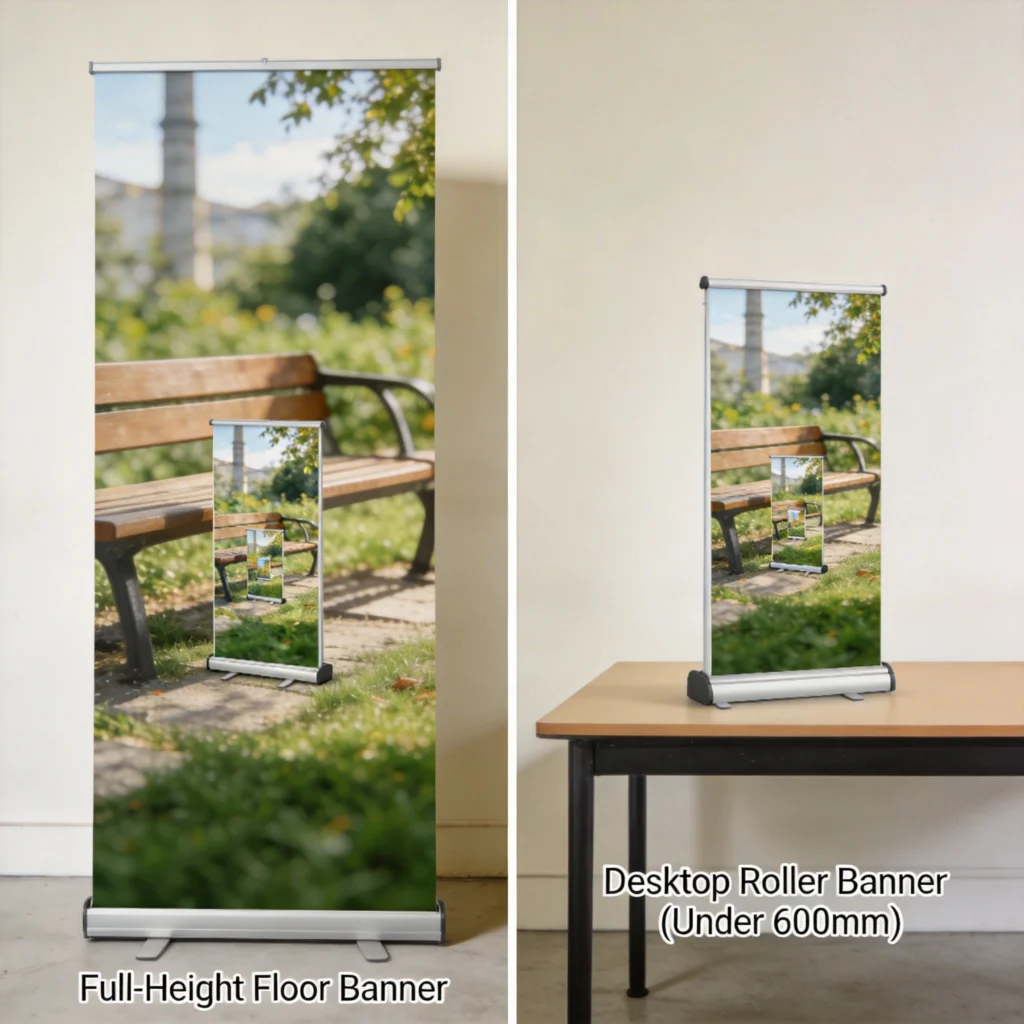
A desktop roller banner is a compact, retractable display designed for table-height viewing, usually under 600 mm tall. Unlike full-height stands, it lives on reception desks, exhibition tables and retail checkouts, placing messages right beside conversations. Because it is small and lightweight, staff can reposition it in seconds to test sightlines and improve engagement during busy periods.

Businesses use these mini roller banners to highlight add-on services, seasonal promotions or QR codes that link directly to booking pages. When paired with a larger custom roller banner behind the counter, they create a layered effect that reinforces the same message at different viewing distances, increasing recall by repeating key visuals within a few metres.

Compared with printed flyers, desktop roller banners last much longer because the printed panel retracts safely inside an aluminium cassette. This protects the graphic from spills and scuffs, so even high-traffic counters can keep displays looking fresh for twelve to eighteen months. The result is a low-cost, semi-permanent promotion that still feels flexible enough to update between campaigns.

1
desktop roller banner

What Is a Desktop Roller Banner and How Is It Different?

What Is a Desktop Roller Banner and How Is It Different?

Unlike full-height roller banners that dominate floor space, desktop versions are designed specifically for table-height viewing. Typically under 600 mm tall, they sit neatly on counters and exhibition tables, keeping your message right beside conversations. Their compact, retractable design makes them easy to move, test sightlines and adapt quickly during events.

Desktop roller banners use the same retractable mechanism as full-size stands but scaled down for close-range viewing. A spring-loaded roller inside a small aluminium base keeps the printed graphic under tension. When you pull the panel up using the top rail, it locks onto a short support pole, creating a self-standing mini display that occupies roughly the footprint of a laptop.

Formats, Sizes and Hardware Options

Most desktop roller banner models range between 200 mm and 600 mm high, with widths from 210 mm (A5) to 420 mm (A3). Bases are typically 250–450 mm wide, weighing under 800 g, which makes them stable yet portable. Many UK printers offer silver anodised aluminium cassettes with clip-top rails and two swing-out feet, reducing wobble when placed near keyboards or card machines.

Desktop vs Full-Size Roller Banners

A full-size custom roller banner often stands 2,000 mm tall, designed for visibility across a hall, whereas a desktop version targets people within 0.5–1.5 m. This short viewing distance changes everything from font sizes to call-to-action placement. Because people read them while seated or leaning on a counter, you can use more detailed copy without overwhelming distant passers-by.

2

Best Use Cases for a Desktop Roller Banner in Business

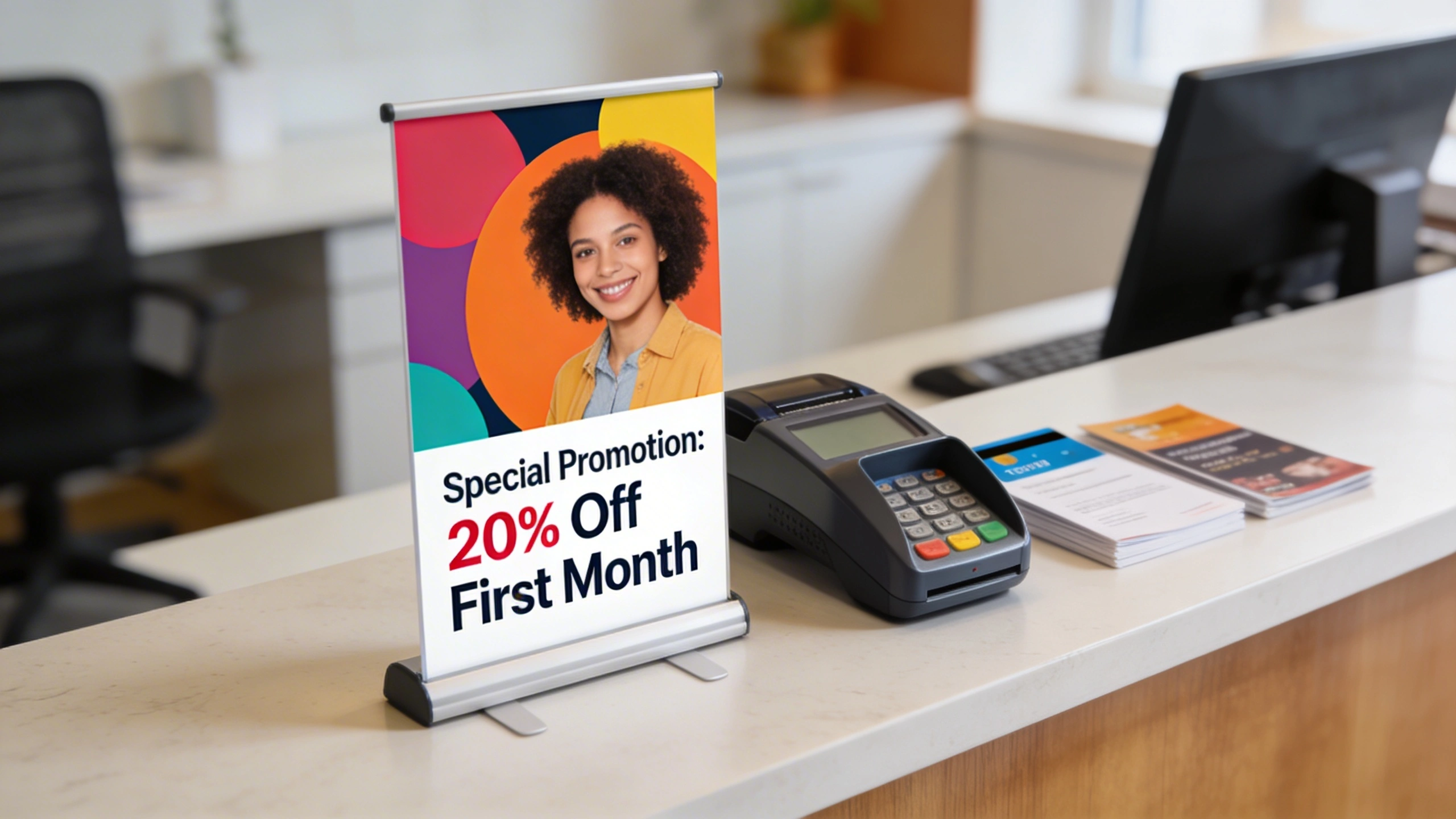
Desktop roller banners excel wherever customers pause for thirty seconds or more, because that dwell time allows them to absorb messages without feeling rushed. Counters, reception desks and consultation tables all create natural viewing windows. When the banner sits directly beside forms, menus or payment terminals, people instinctively glance at it while their hands are occupied.

Best Use Cases for a Desktop Roller Banner in Business

When coordinated with larger vinyl banners, desktop roller banners extend your branding from the backdrop right to the point of conversation. Using the same colours, fonts and core message creates a seamless visual journey, so visitors recognise your offer from afar and then see it reinforced at the desk as they engage with staff.

Ideal Locations and Scenarios

Reception areas in clinics, salons and professional services firms often have unused desk space facing visitors. Positioning a 400 mm-high banner near the sign-in sheet lets you promote membership plans or referral schemes. At trade shows, exhibitors place desktop roller banners at the front of tables to frame product samples, ensuring brand visibility even when the stand is crowded.

Placing a desktop roller banner within arm’s reach of where customers sign, pay or check in can lift enquiry rates by 10–20%, because you are intercepting attention during unavoidable waiting moments.

Examples Across Different Sectors

In retail, small roller banners at tills can highlight three-for-two offers or extended warranties, using bold prices and short benefits. Cafés use them to push loyalty cards or app downloads, sometimes featuring a large QR code for quick scanning. B2B teams place them on meeting-room tables during pitches, subtly reinforcing credentials while laptops display more detailed slides.

3

Design Essentials for an Effective Desktop Roller Banner

Design Essentials for an Effective Desktop Roller Banner

Effective desktop roller banners rely on clear hierarchy: a bold headline that can be read at a glance, a concise supporting message and one obvious call-to-action. Strong brand colours and simple imagery help the design stand out in a busy environment, ensuring your key offer remains legible from typical desk-viewing distances.

Designing a desktop roller banner means optimising for reading distances of 40–120 cm. At that range, 18–28 pt body text and 40–60 pt headings remain comfortable to read. Because the banner is relatively short, every centimetre of vertical space matters. Prioritising a single main message avoids clutter, while secondary details support but never compete with the core offer.

Layout and Readability at Close Range

Start by dividing the panel into three zones: top for logo, middle for benefit-led headline, bottom for call-to-action. Eye-tracking studies show people focus on the central third first, so craft a 6–10 word promise like “Book Same-Day Repairs While You Wait.” Use high-contrast colours; for example, dark navy text on a pale background tests well under mixed indoor lighting.

Imagery, Branding and Message Hierarchy

Because people view these banners up close, photography can show finer details such as product textures or interface screens. Use one strong image occupying 30–40% of the height rather than multiple thumbnails. Maintain at least 10 mm of margin around edges to prevent trimming issues. Align colours and fonts with your custom vinyl banners to create a consistent visual language across all touchpoints.

4
desktop roller banners

Coordinating Desktop Roller Banners with Larger Vinyl Banners

When you combine a desktop roller banner with larger custom vinyl banners on walls or rails, you create a multi-layered communication system. The big banner handles long-distance attraction with bold visuals, while the desktop piece delivers more specific, action-oriented messaging. Visitors first notice the large graphic from 10–20 m away, then encounter the detailed prompt when they step up to the counter.

Coordinating Desktop Roller Banners with Larger Vinyl Banners

Desktop roller banners excel wherever customers pause for a moment—at retail checkouts, on exhibition tables or across reception desks. Sitting directly beside staff, they reinforce spoken messages with strong visuals, nudging people toward promotions, sign-ups or upgrades without feeling intrusive, and ensuring your key offer is always present in the conversation.

Visual Consistency and Campaign Structure

Use the same hero image, colour palette and primary headline across both formats, but adjust the subtext. The vinyl banner might carry a short strapline and URL, whereas the desktop roller banner includes pricing, time-limited dates and QR codes. This repetition strengthens brand recall; marketing studies suggest consistent creative can improve campaign recognition by 20–30% across channels.

Think of large custom vinyl banners as billboards and desktop roller banners as conversation cards; one grabs attention from afar, the other guides the decision right at the point of discussion.

Coordinated Examples and Practical Tips

For an event, you might hang a 2 m × 1 m vinyl banner reading “Free Digital Audit” above your stand, then place a desktop roller banner on the table explaining the three audit steps. Retailers can mirror window vinyls promoting “20% Off Accessories” with counter-top banners listing qualifying brands. Reusing artwork across formats also reduces design time and keeps print costs predictable.

5

Ordering and Customising Your First Desktop Roller Banner

Ordering a desktop roller banner online usually takes less than fifteen minutes once your artwork is ready. Most print sites offer preset sizes like A4 or A3, with options for 220–300 micron polypropylene or 440–510 gsm PVC. Understanding how these specifications affect durability, curl resistance and colour reproduction helps you balance budget against expected campaign length.

Ordering and Customising Your First Desktop Roller Banner

Specification and Price Comparison

The table below compares typical UK options for a first-time order, based on common pricing from mid-range online printers. Prices assume full-colour CMYK printing and exclude VAT and delivery. While exact figures vary between suppliers, these benchmarks help you decide whether to upgrade material thickness or stick with a basic cassette for short-term use.

Size & Material Approx. Dimensions Typical Use Duration Guide Price (Single Unit) Print Type
A5 PP 220 micron 148 × 210 mm panel 3–6 months light use £9–£12 4-colour digital CMYK
A4 PP 220 micron 210 × 297 mm panel 6–9 months indoor £12–£16 4-colour digital CMYK
A3 PP 300 micron 297 × 420 mm panel 9–12 months indoor £18–£24 High-resolution inkjet CMYK
300 mm PVC 440 gsm 300 × 500 mm panel 12+ months frequent use £20–£28 Solvent-based CMYK
Custom width premium Up to 420 mm wide 12–18 months intensive £25–£35 Solvent or latex CMYK

When uploading artwork, most printers request high-resolution PDFs set at 150–300 dpi at final size, with 3–5 mm bleed and crop marks. If you already use a supplier for a full-size custom roller banner or larger custom vinyl banners, ask for their desktop template. Matching profiles ensures colours stay consistent across every display, avoiding slight shifts in brand tones between products.

6

Portable Promotions: Using a Desktop Roller Banner on the Go

Portable Promotions: Using a Desktop Roller Banner on the Go

Because a desktop roller banner usually weighs under 1 kg and fits inside a small carry sleeve, it becomes an ideal tool for mobile teams. Sales reps, trainers and consultants can slip one into a laptop bag, then deploy it in under thirty seconds at client offices, hotel meeting rooms or coworking spaces, instantly branding otherwise generic environments.

On-the-Road Usage Ideas

Field staff often use these banners to reinforce a single, recurring message such as a new service tier or support package. During a software demo, a banner beside the laptop can show the three key benefits and a support phone number, so attendees photograph it instead of requesting brochures. This reduces printed handouts while still giving prospects a visual reminder.

  • Place the banner beside your laptop during client demos to keep brand and key benefits visible in every photo.
  • Use a travel-friendly 300 mm-wide model that fits diagonally in standard backpacks without stressing the cassette.
  • Print a neutral, evergreen message so the same banner works across multiple regions, sectors and campaign cycles.
  • Combine with a small tablet stand displaying a sign-up form, turning any café table into a pop-up lead capture point.
7
Roller Banners

Care, Storage and Reuse of Desktop Roller Banners

Looking after a desktop roller banner is straightforward but extends its life significantly. The main risks are panel creasing, edge fraying and base scratching, all of which stem from rough handling or poor storage. Treating the cassette like a small electronic device, rather than a disposable flyer, helps preserve both the mechanism and the printed surface for repeated campaigns.

Care, Storage and Reuse of Desktop Roller Banners

Handling, Cleaning and Storage

Always retract the graphic slowly, guiding it into the cassette instead of letting the spring snap it back. Rapid retraction can cause the top rail to twist or the panel to skew on the roller. For cleaning, use a soft, lint-free cloth slightly dampened with water; harsh chemicals may dull the protective laminate and reduce colour vibrancy over time.

  • Store banners upright in their carry sleeves to prevent warping, avoiding radiators or windowsills that cause heat damage.
  • Label each cassette end with campaign or product names for quick selection before events and seasonal promotions.
  • Transport multiple units in a padded tote, separating them with cardboard to prevent bases scratching each other.
  • Retract banners completely overnight in retail spaces to shield graphics from cleaning sprays and accidental knocks.
8

Frequently Asked Questions About Desktop Roller Banners

Frequently Asked Questions About Desktop Roller Banners

Businesses exploring desktop roller banners often ask how long they last, whether they can change graphics, and how printing compares with larger displays. Understanding these points helps you budget realistically and decide when to invest in higher-spec materials versus treating the banner as a short-term promotional tool aligned with a specific event or seasonal campaign.

Lifespan, Re-Skinning and Print Options

With careful handling, a polypropylene panel used indoors can remain presentable for twelve to eighteen months before showing edge wear. Some cassettes allow re-skinning by fitting a new graphic onto the existing roller, which can cost 30–40% less than buying a full unit. Most suppliers print in full-colour CMYK, matching the process used for a standard custom roller banner.

Common Practical Questions Answered

Customers also ask whether desktop models can replace larger custom vinyl banners. They work best as complements, not substitutes, because they lack long-distance visibility. Another frequent query concerns minimum order quantities; many online printers allow single-unit orders, making it easy to test one design before rolling out a set of ten or more across multiple locations.

When choosing between PVC and polypropylene, consider where the banner will live. For a static reception desk, a slightly heavier PVC panel resists curling near radiators. For travelling sales teams, lighter polypropylene keeps luggage weight down. If colour accuracy is critical, request a printed proof or check that your supplier uses ICC colour profiles aligned with your existing marketing materials.

Cart